A small tutorial for you to setup your Bluesky account quickly.
Language content
Go to Settings > Languages and check the last drop down menu (Content Language). Uncheck all languages for your timelines to show posts in any language.
By default, Bluesky shows you posts in your native language only.
Adult content
Note: in certain countries, you must verify your identity to be able to enable Adult Content.
On the web client, go to Settings > Moderation, enter your birth date and check the Content filters section. If you want to be able to see Adult content, change all of them to Show or Warn.
Warn means you will be able to see the post but the actual content will be hidden under a warning.
Go to the Bluesky Moderation Service account and check all the moderation option, especially Sexually Suggestive (Cartoon) and Rude. Set them to Off or Warn.
Feeds
By default, Bluesky shows you only two feeds: Discovery and Following, but you can add more.
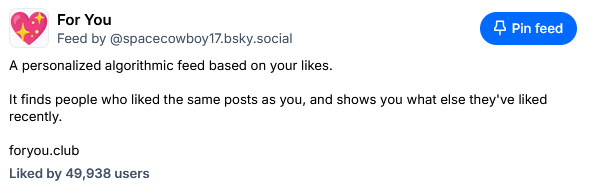
You should also add For You, which shows you posts based on your likes. The content will be very different than Discover.
If the link above doesn’t work, tap on # Feeds on the left menu in Bluesky, then search for For You in the Discover Feeds search bar. The good one is the feed with the pink heart. Then tap on Pin feed to add it on your Home.
More Feeds
I maintain some fandom-based feeds for your entertainment, that you also may like to pin to your home.
Alternatively, you can follow the accounts that I manage to re-share fan-art of the same fandoms.
Here’s a quick list:
Hellaverse (Hazbin Hotel/Helluva Boss)
Regular feed / Picture-only feed / Best-of feed / Fan-art re-share account
The Amazing Digital Circus
Feed / Fan-art re-share account
Miraculous (Ladybug)
Feed / Fan-art re-share account
Knights of Guinevere
Feed / Fan-art re-share account
Gameoverse
Feed
The Owl House
Feed / Fan-art re-share account
She-Ra
Feed / Fan-art re-share account
Steven Universe
Feed / Fan-art re-share account
Demoscene
Feed
That’s All
Enjoy!